How We Built Reliable RV Internet with Starlink + Cellular
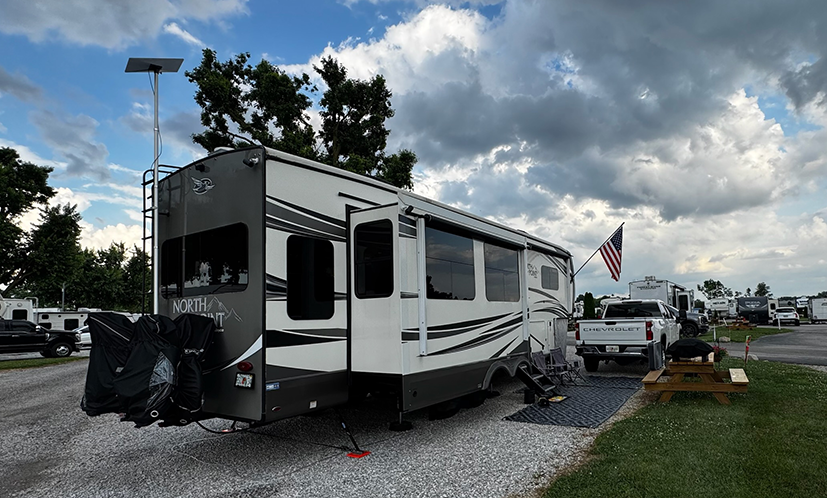
We’ve all been there—sitting in an RV park, trying to load a simple webpage while the campground Wi-Fi groans under the weight of everyone streaming Netflix at the same time. It doesn’t take long before you realize that if you want reliable internet, you’re on your own.
When we first started planning our RV adventures, internet wasn’t exactly the most exciting topic. We were dreaming about epic views, great food, and meeting people along the way—not Wi-Fi speeds. But it didn’t take long to realize that without a solid internet setup, we’d be in trouble. Both of us work remotely, which means we can’t afford to have Zoom calls freeze or uploads fail. And after hours? We still want to stream, share our adventures online, and map out our next stop.
After a lot of research, countless blog posts, and more YouTube videos than we can count, we finally pieced together the setup that made the most sense for us: a combination of Starlink, cellular internet, and a Peplink router. It’s not perfect (nothing in RV life ever is), but it’s reliable enough that we can work, stream, and stay connected almost anywhere.
Our Internet Setup
Here’s what keeps us online:
Router:Peplink B-One 5G
Cellular Antenna:Parsec Husky Pro 7-in-1
Satellite:Starlink Gen 3 dish, mounted on an EEZ RV Products telescoping ladder pole
Cellular Provider:RoamLink (a multi-carrier eSIM that switches between AT&T, Verizon, and T-Mobile for the best available signal)
Think of the Peplink router as the “brains” of the operation. It decides when Starlink should take the lead, when to switch to cellular, and even has a feature called SpeedFusion that blends connections together. To us, it feels like having a backup generator for the internet—when one drops, the other keeps things running without us having to think about it.
Why Starlink Is Our Backbone
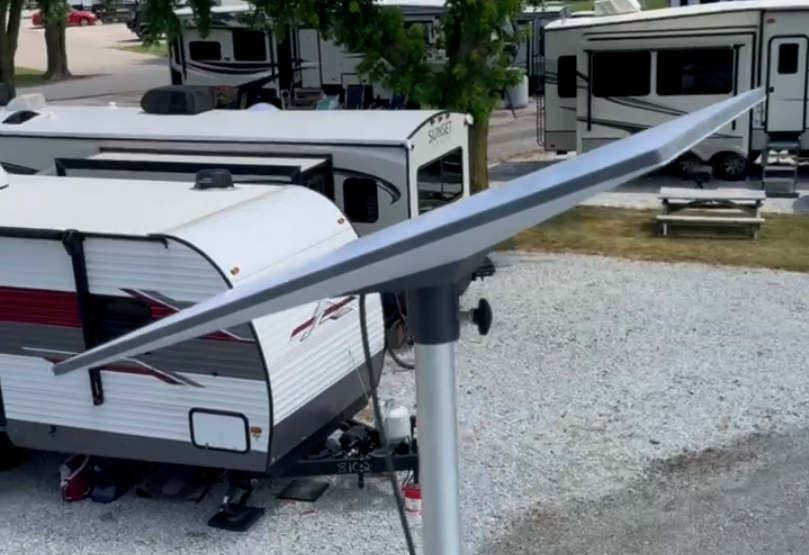
Starlink is the piece that changed everything for RVers. Before, satellite internet was slow and impractical. Now, with Starlink, we can be parked in a campground miles from town and still have speeds that rival home internet.
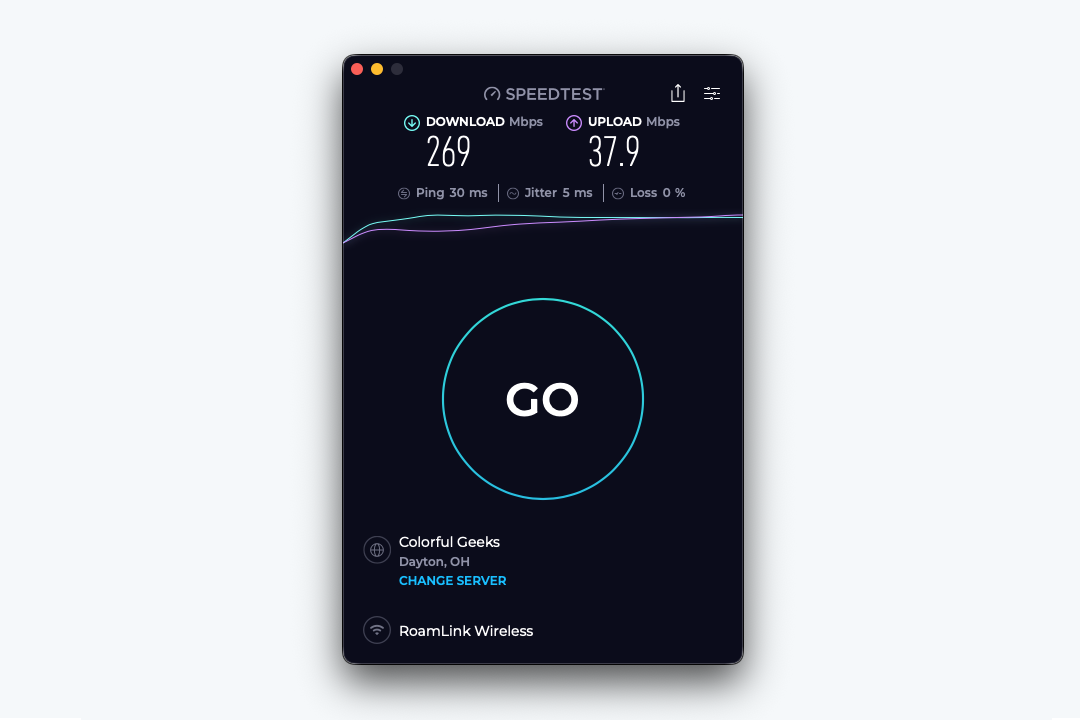
On a good day, we see 200–300 Mbps download and 30–60 Mbps upload. That’s more than enough for both of us to work side by side, with Zoom calls running, emails flying, and maybe a little YouTube playing in the background.
Think of it as having your own personal satellite dish that follows you around. It doesn’t care if you’re in the desert or by the ocean—as long as it sees the sky, you’re online.
We mount our dish on a telescoping ladder pole—super simple to set up when we arrive and take down when we leave. The only real enemy? Trees. Starlink does not like trees. If we’re parked in a heavily wooded site, expect some buffering or outright drops. And wouldn’t you know it, the prettiest shaded sites are often the worst for internet. That’s when our backup comes in handy.
Why Cellular Is Our Safety Net
For backup, we rely on RoamLink, a plan that can automatically switch between the big three carriers: AT&T, Verizon, and T-Mobile. What’s nice about RoamLink is that it gives us priority data, which means faster speeds even when a cell tower is busy. Pair that with the Parsec Husky Pro antenna on the roof, and we can often pull in a usable signal even when phones barely get one bar.
It’s like having three different cell phones in one plan, and whichever tower is strongest gets to do the heavy lifting.
Cellular has saved us more than once when trees blocked Starlink. It’s also the only option that works while driving—perfect for navigation or pulling up directions on the fly.
The Glue That Holds It Together: Peplink
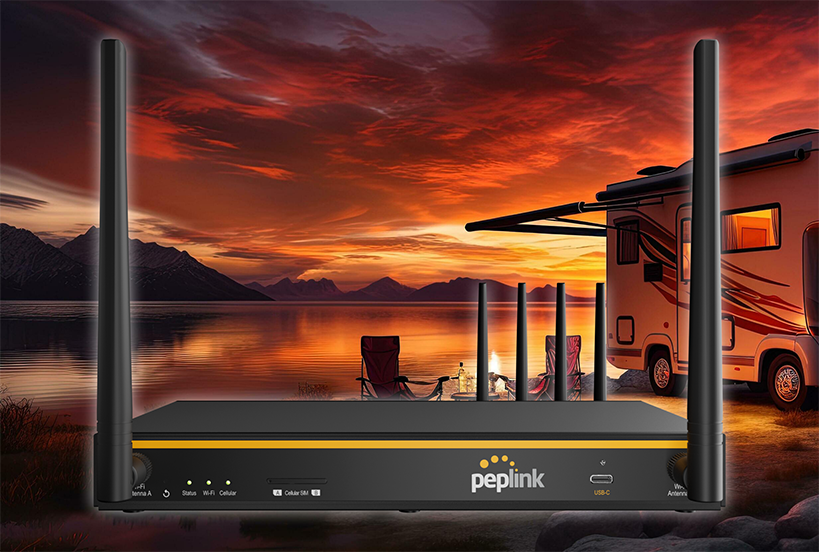
The Peplink B-One 5G router is what makes this entire setup seamless. Without it, we’d constantly be switching devices between Starlink and cellular, trying to guess which connection might be stronger. With Peplink, all of that happens automatically in the background.
The real magic comes from a feature called SpeedFusion. Think of SpeedFusion like internet teamwork. Instead of forcing us to pick one connection over the other, it blends Starlink and cellular together. If Starlink slows down for a second because of tree cover, SpeedFusion instantly fills in the gaps with cellular data. If a cell tower gets overloaded, Starlink carries more of the weight.
In real life, that means:
Video calls don’t freeze when one connection hiccups.
Uploads don’t fail halfway through, even if a signal drops for a moment.
Streaming stays smooth, with no sudden buffering when Starlink or cellular has a bad minute.
We don’t notice the handoff—it just feels like a steady, reliable internet connection. And that’s what makes SpeedFusion such a game changer for RV life. Honestly, the Peplink router has been one of the best investments we’ve made for remote work and day-to-day living on the road.
How We Installed It in Our RV
Having the right gear is one thing, but figuring out how to mount it all in an RV is another challenge entirely. When I first started planning, I’ll admit I was nervous—mainly because I knew at some point I’d be cutting a 2-inch hole through the roof of our Jayco. Nothing gets your heart racing like holding a drill and thinking, “Well, here goes nothing…”
Mounting on the Roof
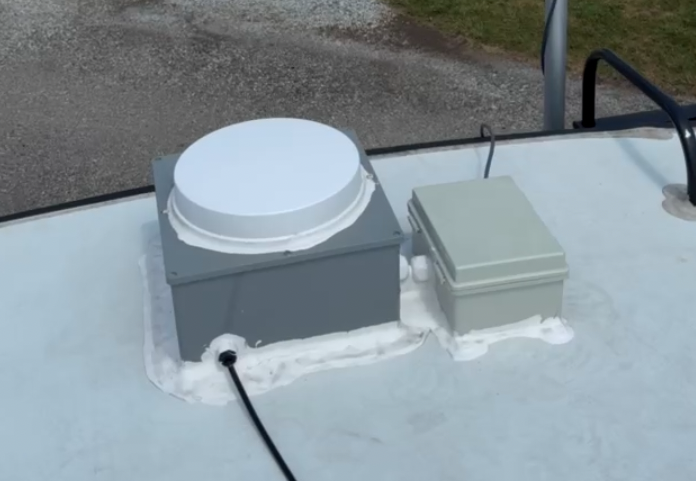
We mounted the Parsec Husky Pro antenna on the tail end of the roof to keep it clear of AC units and anything else that might block its signal. To make the install solid and weatherproof, we used heavy-duty electrical junction boxes and mounted the Parsec on top of one. Inside that box, we cut a matching 2-inch hole through both the box and the RV roof—wide enough to handle multiple cables, including a dedicated line for the Starlink ethernet as well as the coaxial connection for our King OTA omnidirectional TV antenna.
Right next to it, we added a second junction box specifically for the Starlink ethernet cable. During travel, the cable stays neatly stored inside. When we set up camp, we just open the box, pull out the length we need, and plug it into the Starlink dish on the pole.
Between the cable glands, self-leveling lap sealant, and a layer of VHB tape, everything is sealed tighter than a submarine hatch. Months and plenty of heavy rainstorms later, it’s still bone dry—no leaks, no worries.
The Starlink pole mount stays attached to our ladder full-time, but we remove the dish and pole when traveling. That way it’s quick to set up when we arrive, but nothing rattles or shifts on the road.
Inside Setup
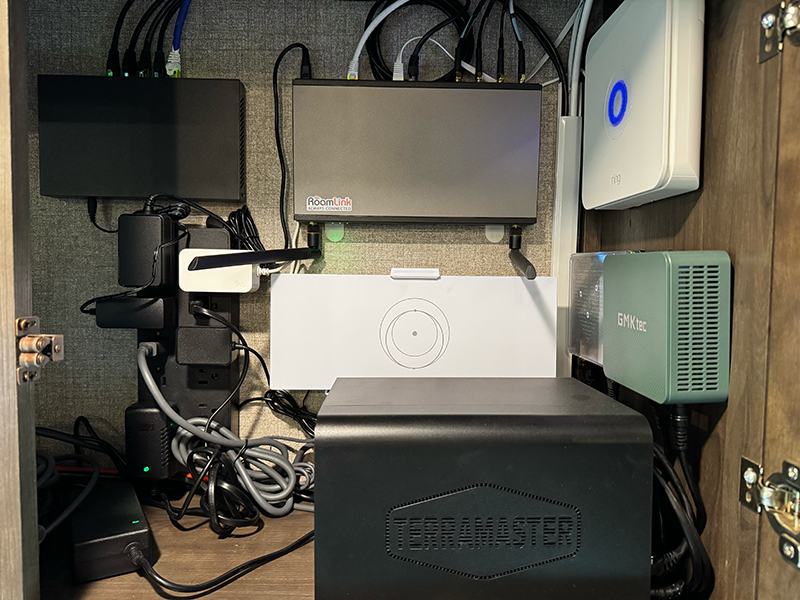
All the “brains” live in the rear cabinet above our sofa: the Peplink B-One 5G router, the Starlink router, our TerraMaster NAS, Ring Alarm system, Home Assistant Green, a HomeBridge mini PC, and switches. To keep things safe, everything runs through a surge protector and a battery backup system. That gives us a cushion during power outages so we can shut things down properly if needed.
Cables are tucked as neatly as possible behind cabinet panels, and for now, on hot days we just leave the cabinet door open for airflow. But I’ve already got plans for small USB fans to keep things cool when the doors are shut—because tech gear in a hot RV cabinet is basically a recipe for crankiness.
Running the Cables
Running the cables was easily the hardest (and most frustrating) part. We used the 2-inch roof opening to drop cables straight into the rear cabinet, but from there we had to run CAT7 ethernet lines all over the RV.
One line snakes into the entertainment cabinet above the TV where we keep another switch, an Apple TV, and the HDHomeRun box.
Another runs through the underbelly and pops up near the desk where our dining table used to be—perfect for two wired workstations.
A third cable makes its way all the way up to the bedroom desk (we turned the dresser into a fold-down desk). That one connects to another switch, an Apple TV, and a Peplink AP One AX Lite.
Yes, it involved fishing wires through walls, drilling 1-inch and ½-inch holes in the slides and underbelly, and plenty of crawling around under the RV. I even had to label the cables with painter’s tape so I didn’t mix them up while wrangling everything. It wasn’t glamorous, but it was worth it.
Now, don’t let all this talk about junction boxes and cable glands scare you off—you don’t have to go this deep if you don’t want to. But for us, the peace of mind was worth the effort.
The Network Layout
Here’s a look at our full network layout inside the Jayco:
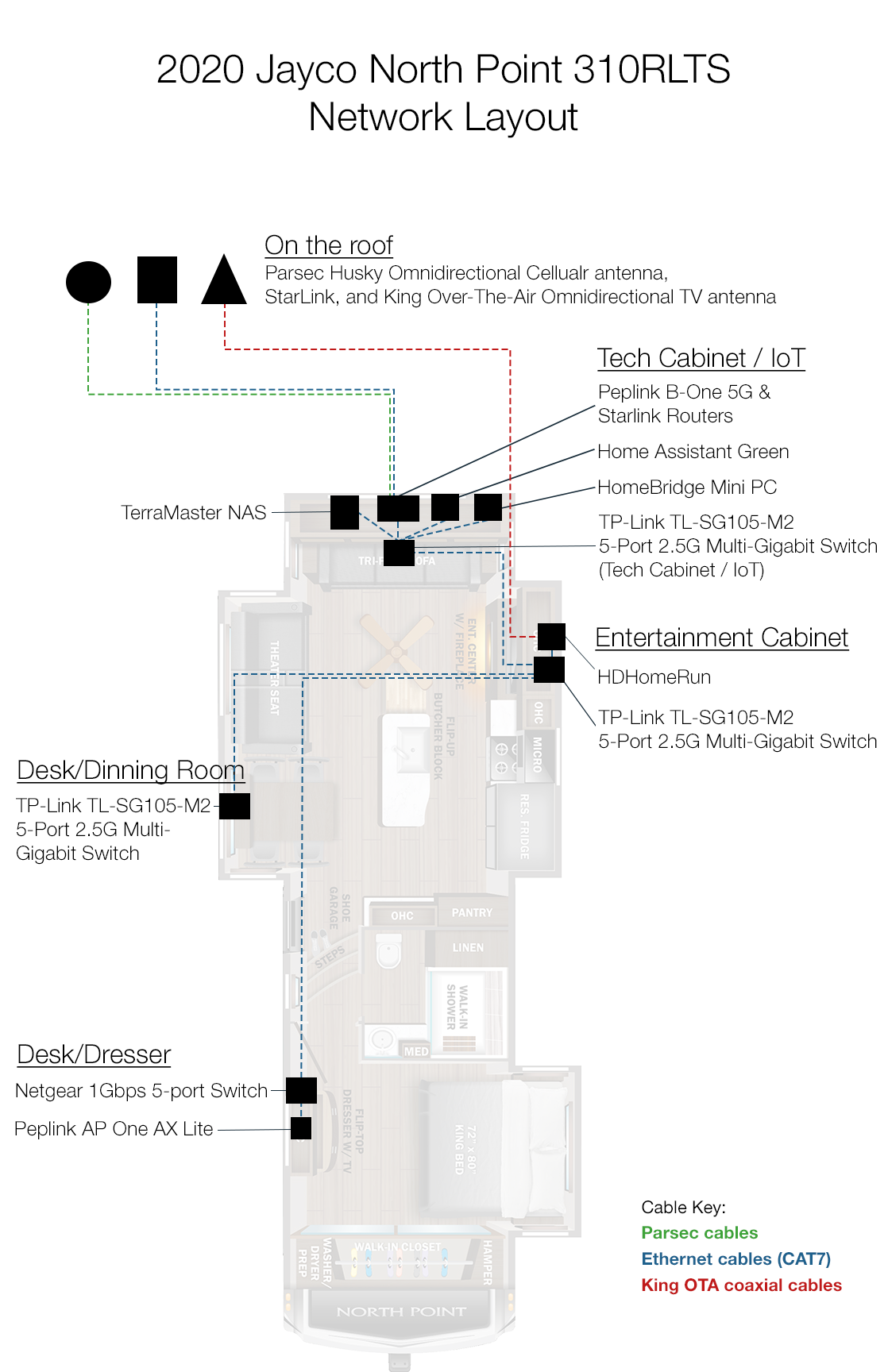
Our RV network layout — color-coded to show how Starlink, cellular (Parsec), and over-the-air TV (King) connect through the Peplink router and switches to keep everything online across the RV. Coaxial cable and each ethernet cable connecting a switch to another switch is ran under the RV then up through the floors.
At a glance:
Roof:Parsec antenna, Starlink, and King OTA TV antenna.
Rear Cabinet: All the core gear—routers, NAS, smart home hubs, and power management.
Entertainment Slide: Switch, Apple TV, and HDHomeRun for live TV.
Dinette Desk: Switch for two computers.
Bedroom Desk: Switch for work, Apple TV, and Wi-Fi expansion.
The dotted lines? That’s all the ethernet cabling zig-zagging through walls, slides, and the underbelly to keep everything tied together.
Lessons Learned
The scariest moment was drilling that first hole in the roof. I must have triple-checked my measurements a dozen times. But months later, after rain, storms, and travel, we’ve had zero leaks.
If I could give one piece of advice, it’s this: plan, plan, plan. Lay everything out before you start, and don’t rush. Watch walk-through videos of RV roof installs, pick a sunny day, and make sure you’ve got every part you need before cutting anything. Seal everything—cable glands, sealant, VHB tape. And if your RV roof is like ours (DiFlex II rubber), trim away the roofing material around your drill spot first so it doesn’t snag and stretch.
Looking back, I wouldn’t change much. The setup is clean, professional, and rock-solid. And honestly? Once it’s all installed, the best part is forgetting about it—because it just works.
Real-World Wins and Fails
Most of the time, our system feels like magic. We’ll be parked in a campground, fire up Netflix, and forget that we’re streaming through satellites and cell towers in the middle of nowhere.
But it’s not flawless. The toughest test we’ve faced so far was at Thousand Trails Horseshoe Lakes. We loved the campground, but it was like the Bermuda Triangle for internet. Trees everywhere meant Starlink struggled, and the cell towers were nonexistent. We managed to limp along with a weak Starlink connection, but it was painfully slow. We loved the place, and we’ll go back—but next time, we’ll definitely scout a site with a clearer view of the sky.
How We Actually Use It
Daytime: Remote work. Both of us depend on consistent internet for meetings, emails, and projects.
Evening: Streaming, uploading videos, posting to social media, and trip planning.
Failsafes: With SpeedFusion smoothing things out behind the scenes, we hardly notice hiccups anymore.
There have been a few times when we’ve gone without connection, usually in more remote locations. But honestly? If we don’t need to work that day, we don’t stress it. Sometimes disconnecting ends up being part of the fun.
Why Redundancy Matters
One of the smartest choices we made was having more than one way to get online. Relying on a single internet source is asking for trouble—trees, weather, or even a busy cell tower can knock you offline in an instant. By combining Starlink and cellular through our Peplink router, we’ve built in redundancy.
That means if one connection drops, the other is right there to pick up the slack. In practice, it feels seamless—our Zoom calls don’t suddenly freeze, our uploads don’t fail halfway through, and we don’t lose navigation while driving. It’s peace of mind knowing we’re not putting all our eggs in one basket.
Tips for Other RVers
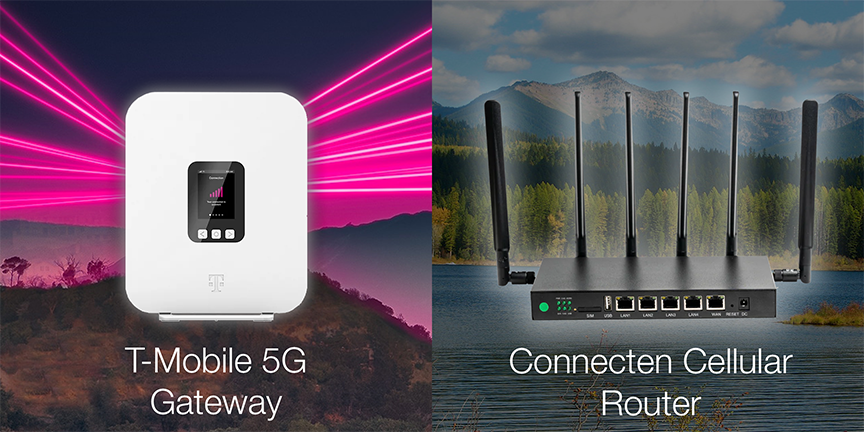
When it comes to RV internet, there’s no one-size-fits-all solution. It really depends on your needs, your budget, and how much you rely on being connected. Here are three clear paths, from simplest to most robust:
Easiest Setup: T-Mobile AWAY Plan
If you just want something simple and fast to get started, the T-Mobile AWAY plan is about as plug-and-play as it gets. For around $160/month, you get a 5G gateway device that connects directly to T-Mobile’s network. No external antennas, no satellite dishes, no drilling holes in the roof. Just plug it in, power it up, and you’re online.
This is perfect for RVers who stay mostly in areas with solid T-Mobile coverage and want minimal fuss. The tradeoff? If you’re parked somewhere with weak T-Mobile service, your internet may struggle or not work at all.
Learn more about T-Mobile Away
Step Up: ConnecTen Multi-Carrier Plan
If you travel more widely and don’t want to gamble on just one carrier, ConnecTen is a smart next step. For about $120/month (plus an activation fee and a one-time device rental fee), you get unlimited data and hardware that automatically connects to whichever major carrier (Verizon, AT&T, or T-Mobile) has the strongest signal where you’re camped.
That means no swapping SIMs, no guessing which plan to buy, and a much better chance of getting online in more places. It’s more reliable than T-Mobile alone, but it still depends entirely on cellular towers. If you’re really out there in the boonies with no service at all, you’ll still be offline.
Most Reliable: Our Full Setup
For those of us who rely on the internet every day for work, streaming, or staying connected, a more advanced setup is worth it. Here’s what we use and why it’s better:
Peplink B-One 5G Router → The brains of the system. It manages multiple connections, automatically switches between them, or even blends them with SpeedFusion so your calls don’t drop and your uploads don’t fail. Learn more.
Parsec Husky Pro 7-in-1 Antenna → Mounted on the roof, this antenna grabs cellular signal far better than any gateway’s built-in antennas, turning weak reception into usable speeds. Learn more.
Starlink Gen 3 Dish (on a telescoping ladder mount) → Gives us satellite coverage when cell towers aren’t an option. As long as we can see the sky, we can get broadband-level internet almost anywhere. Learn more.
RoamLink Multi-Carrier Plan → Priority cellular data that automatically hops between carriers. When Starlink is blocked by trees or clouds, RoamLink keeps us online. Learn more.
Compared to T-Mobile or ConnecTen alone, this setup has true redundancy. If one connection dips, the others immediately pick up the slack. That means no frozen Zoom calls, no failed uploads, and no stress about being stuck offline when it matters most. It costs more and takes more work to set up, but the result is internet that “just works” almost anywhere we go.
Why This Setup Is Superior
Because of all this, your experience will be more consistent, especially in real-world scenarios like dense tree cover, partially blocked signal, or overloaded towers.
The Cost of Staying Connected
Let’s talk about the part nobody likes to mention: the price tag. Having both Starlink and RoamLink isn’t cheap. Each one runs about $150–$160 per month, which means we’re paying over $300 a month just for internet.
To put that in perspective, someone with Xfinity at home might be paying around $50 a month for comparable speeds. So yes, on paper, RV internet costs several times more than what you’d spend sitting comfortably in a sticks-and-bricks house.
Three hundred bucks is the kind of number that makes you pause and ask yourself, “Am I really spending the same amount on internet as some people spend on their car payment?”
But here’s the thing: when you’re on the road, internet isn’t just about streaming Netflix. It’s our lifeline. It’s how we both work remotely, how we stay in touch with family, how we plan the next stop, and how we share these adventures with you. Without it, this lifestyle simply wouldn’t be possible.
And honestly? The freedom it buys us is worth every penny. For that $300, we can park by a lake in the middle of nowhere, fire up Zoom calls without a hiccup, stream a movie under the stars, or upload a YouTube video from a campground in the mountains. That’s not something you can put a price tag on.
Sure, it stings a little every time the billing emails roll in, but we’ve learned to think of it as a trade-off. Less “cheap cable bundle with 200 channels you never watch,” more “we can live wherever we want and still stay connected.” And when you look at it that way, it doesn’t feel expensive—it feels like freedom.
Clearing Up the Biggest Myth
We hear it all the time: “Good luck getting reliable internet in an RV.” And to be fair, it used to be true. But now? With the right mix of Starlink, cellular, and a router that ties it all together, reliable internet on the road is absolutely possible.
If you’re serious about RVing and need (or just want) to stay connected, don’t settle for campground Wi-Fi. Build a system that gives you peace of mind.
Final Thoughts
Every time I see that bill, I wince a little. But then I remember where I’m sitting—maybe by a lake, maybe tucked in the mountains—and I’m online like I never left home. That’s when I smile and think: worth it.
At the end of the day, internet on the road isn’t about chasing the fastest speeds—it’s about creating the freedom to live, work, and explore without being tied to one place. And for us, that freedom is priceless.
Affiliate Disclaimer: Some of the links in this post are affiliate links. This means if you purchase through them, we may earn a small commission at no extra cost to you. We only recommend products we personally use and trust. Supporting us this way helps keep VNR Adventures rolling and allows us to continue sharing our journey.
Author’s Note
We’re Robert and Vahn, the team behind VNR Adventures. Robert is the planner, tech-savvy DIYer, and the one who climbs onto the roof with tools in hand. Vahn is the designer, chef, and lover of all things local who makes sure every stop feels like home. Together, we’re exploring the country one campground at a time while sharing the honest side of RV life — the wins, the challenges, and everything in between.
Our goal is simple: to be a trustworthy resource for anyone curious about this lifestyle. We don’t sugarcoat the costs or frustrations, but we also celebrate the freedom and joy that come with it. Thanks for being here and following along with our journey.
This post is part of our RV Life 101 series — a beginner-friendly guide to the essentials of RV living.
👉 See all RV Life 101 posts here